Uninstall Internet Explorer and Downgrade to older IE 11,10,9,8
If you have accidentally updated your Internet Explorer version, or if you have problems with the new one, you can uninstall Internet Explorer from your Windows 8/8.1/7 and reinstall an older IE (IE10,IE9,IE8).
By default, Internet Explorer will be installed along with your Windows OS. The version of IE will be corresponding with the version of Windows OS. For example, IE11 will be preinstalled in Windows 8 or 8.1, in which case you can’t downgrade such version of IE as doing so will only repeat with the same installation of the same version of IE. Well, if you’re on older Windows OS such as Windows 7 and have accidentally updated your Internet Explorer via Windows Update, you can downgrade or revert it to an older version by following the steps below.
While we do not guarantee that this will work for your current IE and Windows version, please proceed at your own risk. In most cases, even if the IE cannot be downgraded, it will reinstall back automatically via Windows Update.
How to Uninstall Internet Explorer and Downgrade to older IE such as IE10/9/8
The below example was for IE9 reverting to IE8 in Windows 7. The same can be applied in any later or older Windows OS. Please backup everything you care of such as your bookmarks, history, etc before trying anything, and please do this at your own risk.
- Close IE and all other programs.
- Go to Start -> Control Panel -> Programs and Features (or Uninstall a program link).
- From the left pane, click View installed updates.
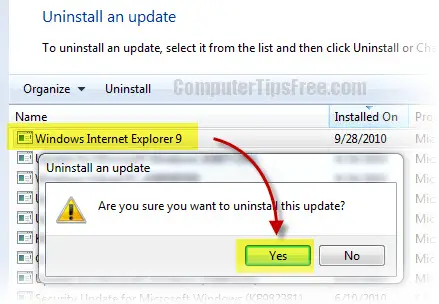
- Find Windows Internet Explorer 9 from the list of installed updates, right-click it and then select the Uninstall option.
- When Uninstall an update dialog box appears, click Yes. Follow the on-screen instructions to uninstall Internet Explorer 9.
- When the IE9 uninstallation is completed, restart your computer.
- After the reboot, the previous version of IE installed on your system will be restored.
I would recommend not to do any downgrade if it’s not the ultimate solution for your problem. You will just need some time to get yourself familiar with the new IE. New Internet Explorers are always come with awesome features, and a much simpler and wiser user interface where you get to access anything easier than ever. The ability of it handling with plugins, addons, and toolbars will usually be improved. You can certainly see improvement in at least a little bit of everything. Instead of reverting back to older IE (ie10,ie9,ie8), you may want to try the new one for a few days.
Update: Now that IE 10 has been released, many of you may want to revert back to IE 9 or 8 from the newly released IE 10. The method is the same when it comes to reverting to an older version of Internet Explorer, provided, of course, if your default version of IE that came in when you first install your Windows is not IE 10. Otherwise, this method won’t work.
Update two: After all these days, this post is still getting a lot of attention as to how to revert your current IE version back to the older ones. Well, for IE 11, if you get it from windows update then certainly this method will still work. By removing the recent update, you get to revert back to your older version of IE. As for Windows 8 users, since IE 11 is the default version, there isn’t a way to revert it. I may be wrong though, if you found a way, please share it with us in the comment section!