Gmail Sign In | Gmail.com Login
So you’re still having problems with Gmail.com login? There has been many cases where people’s Gmail accounts got hacked, email privacy exposed, and others which possibly caused by improper Gmail login habits.
Don’t stay signed in – Gmail.com Login
One of the most important issues regarding Gmail account security and privacy that bothers Gmail users the most is that, whether they should stay signed in with Gmail, or log out whenever they leave Gmail website.
If you tick the stay signed in checkbox when you login to Gmail and close the browser without logging out, the next time you visit gmail.com, you will be automatically signed in. Not only that, it will also automatically log you into all the other Google services (if you have any of them in your Google account), that said, if you stay signed in with your Gmail account and open any other Google services such as Google Adsense, Google Drive or Google Plus, you will be automatically signed in too. That’s what you should be worrying about especially if you have ever logged in to your Gmail account using a public computer and forgot to logout.
Related Post: www.Gmail.com Login | Gmail Sign in Inbox
Our advice is that you should log out whenever you leave any Google Service. You should not tick the stay signed in checkbox if you are to login to your Gmail account using a computer that other people can use.
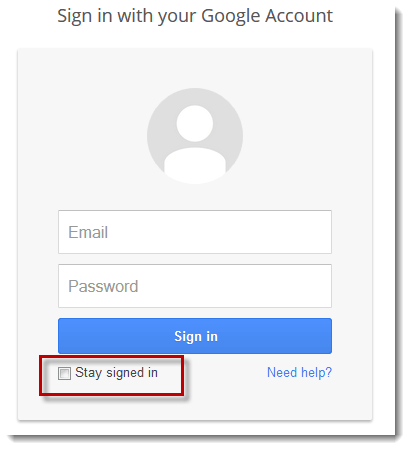
Screenshot from Gmail login page
Do not use third party programs for Gmail.com Login
There are numerous programs and plugins out there claiming to help you do things faster and easier with Gmail. We strongly advice you not to use any of them. Of course, I’m not saying that all of them are dangerous, in fact, some may be genuine and safe to use. But for some reasons, they might still possess threats to your account privacy and security. Therefore, it’s best to stay with Google, and use Gmail genuinely.
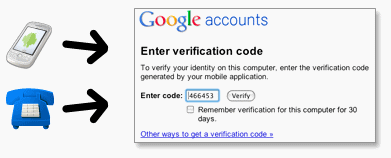
Use 2-Step Verification for Gmail.com Login – Gmail Sign In
For better secured Gmail.com login, we recommmend Gmail users to use the 2-step verification login method – a method newly offered by Google itself. Using 2-step verification will help prevent anyone from hijacking your account with just a stolen password. With 2-step verification enabled in your account, when you login to your Gmail.com account (or any other Google service), you’ll have to verify your identity using both a password and a code sent directly to your phone by Google. This way no one will ever get to login to your account without your acknowledgement. To enable 2-step verification for your Google account (or Gmail.com Login), simply go to your Google Accounts settings page and click on the “Using 2-step verification” link.