Internet Explorer 11/10/9 Menu Bar Missing Windows 8/7
This tutorial explains how to show menu tool bar in Internet Explorer 11/10/9 on a Windows 8/7 system if they happen to be suddenly gone, missing or disappeared.
One of the most common reason menu bar would go missing in Internet Explorer 11/10/9 is that you’ve done an upgrade or re-installation of Internet Explorer. It would revert to its default settings. One of the major changes in IE 11/10/9 is that the menu bar isn’t showing by default. It’s not missing, it’s just hidden. To view the menu bar, you have to press the ALT key on your keyboard to temporarily view it. This can a problem to users who relied heavily on the menu bar. However, there’s a way to keep the menu bar always visible.
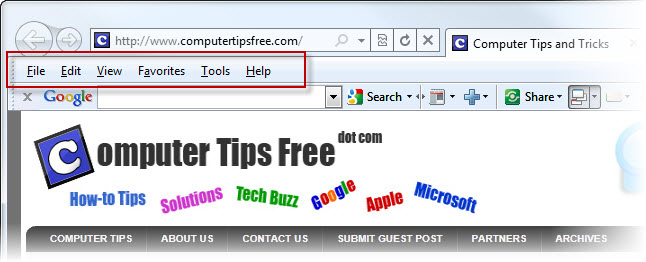
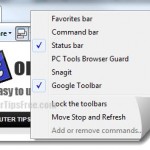
In Internet Explorer 11/10, you can simply re-enable menu bar from the toolbar list.
How to Show Menu Bar in Internet Explorer 11/10
This will only work in the latest IE11/IE10. If your Menu bar suddenly gone missing, or after you’ve upgraded your IE to the latest version, the menu bar is simply reset and remain hidden. All you need to do is to re-enable it from the toolbar list. You don’t have to go through the hard way (second method below) to turn the IE menu bar always on.
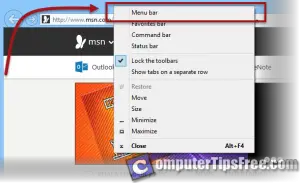
To show Menu bar in Internet Explorer 11/10, right click anywhere near the address bar or tabs, and click on Menu Bar.
To turn Internet Explorer 9 missing menu bar to be always on
In Internet Explorer 9 (or in some rare cases IE 11/10), the Menu bar will not appear from the list. You will have to manually turn the menu bar to be always on via the registry edit.
- Open RegEdit by going to the Start Menu -> type regedit in the search box and then hit Enter.
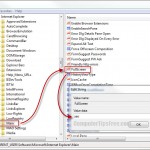
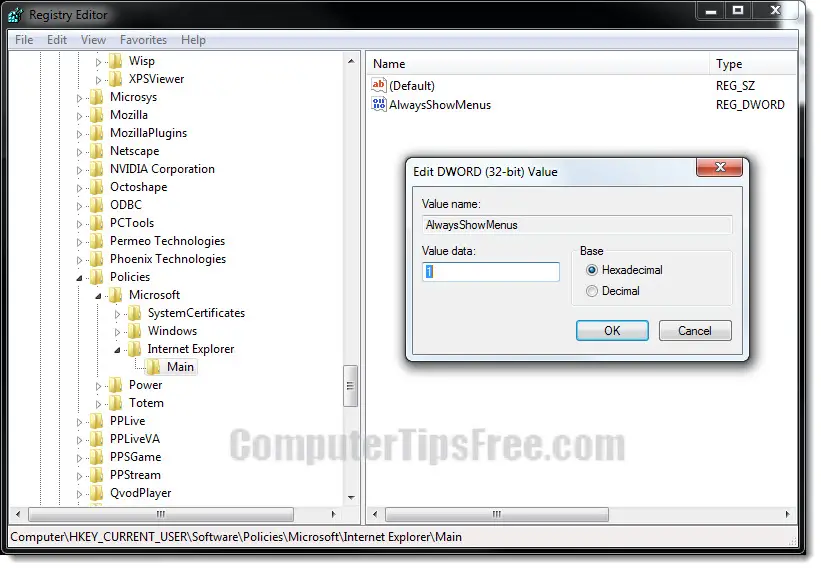
- Navigate to the following registry key:
HKEY_CURRENT_USER\Software\Policies\Microsoft
- Right-click Microsoft -> select New -> Key.
- Name this key Internet Explorer.
- Right-click Internet Explorer -> select New -> Key.
- Name this key Main.
- Right-click Main -> select New -> DWORD (32-bit) Value.
- Name this value AlwaysShowMenus.
- Double-click AlwaysShowMenus, type 1 into the value data field, and then click OK.
- Close RegEdit and then open Internet Explorer 9. The menu bar should be visible on top of your browser now. If you in case need to disable it, simply change the value data back to 0.
It is also very common for your Internet Explorer menu bar to be gone out of sudden. There are numerous kinds of malware from the internet that is capable of stripping the menu bar (or any other things they want to) from your browser. In this case, you may want to scan and eliminate virus from your computer as soon as possible. Also, you may want to scan your computer for registry errors. We recommend Registry Easy.