Fix: Internet / LAN / Wireless Network Connection Icon Missing
Filed in » Problems and Solutions 2Submitted by Nyau
If one day you find your network connection icon disappeared from your taskbar notification area, don’t be panic. This article will show you how to display the missing network connection status icon in the taskbar again (in Windows 7, Vista and XP).
The network connection icon is shown by default if you have a freshly installed Microsoft Windows. The reasons it disappeared could be virus or spyware infections, missing registry, or simply someone had hide it from your computer. You need to investigate the cause of this problem so that your computer’s privacy is secured and the network connection icon won’t disappear again after re-showing it.

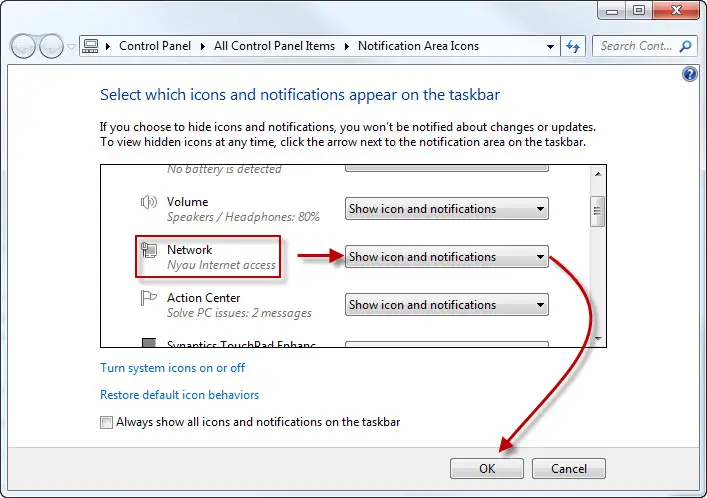
Show Internet/LAN/Wireless Network Icon – Windows 8 or Windows 7
Windows Vista – How to show Internet/LAN/Wireless Network Connection Icon
- Right click anywhere (blank area) on your taskbar, and then click Properties.
- Go to Notification Area tab, under System icons, check / tick the checkbox for Network.
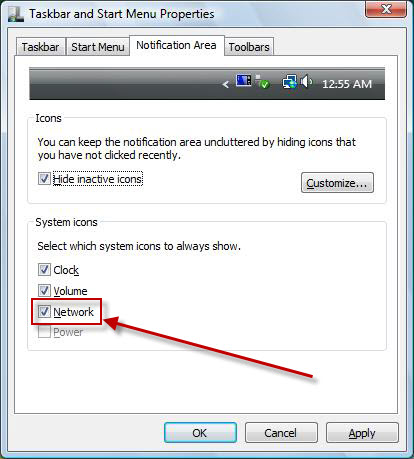
- Click OK and the network connection icon will reappear in your taskbar notification area. If the Network checkbox is grayed out, it’s probably due to some registry errors. We recommend you to download registry easy to fix your current problem as well as all other registry errors that slow down your computer.
Windows XP – How to show Internet/LAN/Wireless Network Connection Icon
- Click Start -> Control Panel -> Network Connection.
- Right click your internet connection adapter. I’m using LAN ( Local Area Connection) which is with a Ethernet cable. Yours may be a wireless adapter or other types of adapter. Select Properties upon right clicking.
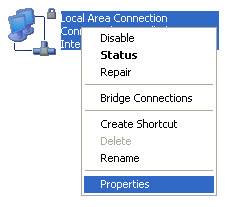
- In the General tab, check / tick the checkbox for Show icon in notification area when connected.
![[Windows XP] How to show Internet / LAN / Wireless Network Connection Icon](https://www.computertipsfree.com/wp-content/uploads/Fix-Internet-LAN-Wireless-Network-Connection-Icon-Missing-xp-2.jpg "[Windows XP] How to show Internet / LAN / Wireless Network Connection Icon")
- Click OK and the network connection icon will reappear in your taskbar notification area. If your internet connection adapter is missing from the Network Connection window, it’s probably due to some registry errors. We recommend you to download registry easy to fix your current problem as well as all other registry errors that slow down your computer.
Share and Like!
Category: Problems and Solutions 2
Looking For Something?
Related Posts